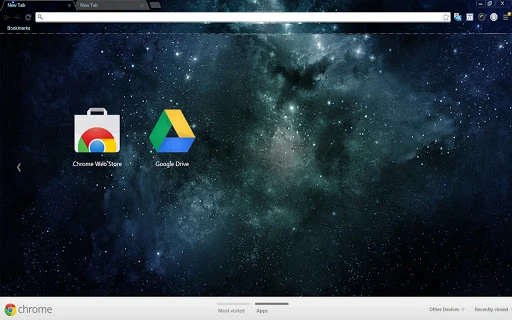

Custom Desktop Themes for Windows & Mac
Overview
The software offers a customizable desktop theme experience designed for users seeking personalization across Windows 7, Windows 8, Windows 10, and Mac operating systems. With a resolution of 1366 x 768, the theme provides a clean visual foundation for desktop backgrounds and interface elements. It serves as a utility for individuals who wish to enhance their digital workspace with a tailored aesthetic.
The primary purpose is to support desktop customization, enabling users to align their environment with personal style or productivity preferences. Target users include casual users, remote workers, and design enthusiasts who value visual appeal and a sense of ownership over their computing environment. Real-world usage scenarios include setting up a dedicated workspace, creating a themed digital setup for creative projects, or simply refreshing a monotone desktop interface.
The developer did not provide additional background information, and no specific technical or functional features beyond the visual theme are included.
Key Features & Capabilities
- Resolution-Optimized Design – The theme is crafted specifically for a 1366 x 768 screen resolution, ensuring clarity and proper fit on compatible devices.
- Multi-Platform Compatibility – Supports Windows 7, Windows 8, Windows 10, and Mac, allowing broad accessibility across common desktop operating systems.
- Visual Customization – Offers a cohesive look through synchronized desktop backgrounds, window borders, and interface elements to create a unified theme.
- Easy Application – Designed for straightforward installation and activation, minimizing setup time for users.
- Request-Based Customization – Users can contact the developer via email to request alternative resolutions or additional theme variations.
These features allow users to quickly implement a consistent visual identity across their desktop. For example, a student might apply the theme to create a focused study environment, while a content creator may use it to match a brand’s visual language. The theme’s simplicity ensures it can be used without technical expertise, making it ideal for users who prioritize aesthetics over advanced functionality. The ability to request new resolutions enables adaptability to different screen sizes, though exact implementation details are not specified.
User Interface, Workflow & Performance
The user interface is minimal, as the software functions primarily as a visual theme rather than a full-featured application. There is no interactive dashboard or configuration panel. Instead, users apply the theme through standard system settings or third-party tools.
Navigation is limited to the operating system’s built-in personalization options. The workflow is straightforward: download the theme file, extract it if necessary, and apply it through the desktop settings menu. Performance is not impacted by the software, as it does not run background processes or consume system resources during operation.
The developer did not specify resource usage details, and no performance benchmarks were provided. Stability is expected to be high, given the static nature of the theme. No known issues with crashes or system conflicts were reported.
Compatibility & System Requirements
Compatibility is confirmed for Windows 7, Windows 8, Windows 10, and Mac operating systems. The theme is designed for devices with a screen resolution of 1366 x 768. Installation size was not specified by the developer.
Exact system requirements were not listed, and no hardware specifications were provided. Platform compatibility information is limited to the listed operating systems. Users are encouraged to verify resolution compatibility with their display settings before application.
For alternative resolutions, such as 1440 x 900, 1600 x 900, or 1920 x 1080, users may contact the developer directly via email. The developer did not provide guidance on supported file formats or installation methods beyond general desktop personalization procedures.
Pros and Cons
Pros
- Free to use with no licensing restrictions
- Available for multiple operating systems including Windows and Mac
- Simple, quick setup with minimal technical steps
- Supports visual personalization for a more engaging desktop experience
- Custom resolution requests are accepted via email
Cons
- No detailed system requirements or file size information provided
- Limited to a single resolution (1366 x 768) unless alternative versions are requested
- No interactive features or dynamic elements included
- Relies on user-initiated application through OS settings
- Developer contact is required for support or customization
FAQ Section
Is this theme compatible with my operating system?
The theme is compatible with Windows 7, Windows 8, Windows 10, and Mac. Users should verify their system supports desktop customization features.
Can I use this theme on a different screen resolution?
While the default resolution is 1366 x 768, alternative resolutions such as 1440 x 900, 1600 x 900, and 1920 x 1080 are available. Users may request these by emailing the developer.
Is the software safe to download and install?
As a static desktop theme, it does not include executable code or runtime components. It poses no security risk when downloaded from official sources.
How do I install the theme?
Download the theme file, extract it if needed, and apply it through your operating system’s desktop personalization settings.
Are updates available for this theme?
Updates are not automatically delivered. Users may contact the developer to request new versions or additional resolutions.
Final Thoughts
This desktop theme offers a straightforward, free solution for users looking to personalize their Windows or Mac environment. While it lacks advanced features or dynamic functionality, its simplicity and multi-platform support make it accessible to a wide audience. The ability to request custom resolutions adds a layer of flexibility not commonly found in basic themes.
It is particularly beneficial for individuals who value visual consistency and a personalized workspace without the complexity of full software tools. The lack of system requirements or performance data does not detract from its core purpose, which remains focused on aesthetics. For those seeking a lightweight, no-cost way to refresh their desktop, this theme delivers a clean and functional experience.
Download Custom Desktop Themes for Windows & Mac now.







